
Customers entering the Oracle Cloud VMware Solution realm frequently encounter difficulties with the deployment process and strategic planning for future environment scaling. To address these complexities, this blog aims to deliver a concise overview of critical factors essential for effectively planning and deploying the Oracle Cloud VMware Solution.
Prerequisites
- OCI account with Universal Credits
- Secure Landing Zone design
OCI account
Initially, it is essential for the customer to establish an Oracle Cloud Infrastructure (OCI) account, provided one is not already in existence, with Oracle Universal Cloud Credits allocated accordingly.
The Universal Credit model is the most flexible buying and consumption model for Oracle Cloud Infrastructure services. There are two ways to purchase OCI services from Oracle:
- Pay As You Go (PAYG)
- Universal Credit annual commitment model
With the annual commitment model, customers purchase a prepaid amount of Universal Credits and the prepaid amount is draws down based on actual usage.
https://www.oracle.com/cloud/universal-credits/
Secure Landing Zone design (Recommendation)
Landing zones have blueprints, which are the main artifact to onboard and run on OCI. Blueprints include a documented design and guidance, Terraform-based IaC templates, and recommended configurations for consistent provisioning. The templates are composed of the framework’s base modules.
Customers select, configure, customize, and deploy the most suitable blueprint for their use case.
https://blogs.oracle.com/cloud-infrastructure/post/new-standardized-oci-landing-zones-framework
Planning your Software Defined Data Center (SDDC) solution
Deploying Oracle Cloud VMware Solution required good planning, optimized sizing and a solid SDDC design to provide a future proof environment.
- Discovery phase
- SDDC design
- Deployment type
- Bare Metal Compute sizing
- Network design
- On-Premises connectivity
- 3rd Party Backup solution
Discovery phase
A good starting point for sizing a SDDC is to analyse the virtual machine requirements in terms of CPU, Memory, Storage capacity, IOPS, Bandwidth, VM peak utilization (CPU & Memory), VM average utilization (CPU & Memory) as well as the VMs availability SLA, Licensing and Workload separation, for example to meet compliance.
Extended list of sizing requirements
- Number of Virtual Machines per Cluster
- Guest Operating System per Virtual Machines per Cluster
- Number – vCPUs per Virtual Machines per Cluster
- Number – Memory (GB) per Virtual Machines per Cluster
- Number – Storage (GB) per Virtual Machines per Cluster
- CPU to vCPU ratio per Cluster
- Number of physical ESXi Hosts per cluster
- Number of physical cores per ESXi Host per cluster
- Number of physical Memory (GB) per ESXi Host per cluster
- Failover configuration per cluster (N+0, N+1 or N+2)
- CPU Type per ESXi Host per cluster (Intel Xeon Platinum 8358)
- Peak CPU and Memory utilization per Host pro Cluster
- Peak CPU and Memory utilization per Cluster
- Average CPU and Memory utilization per Host pro Cluster
- Average CPU and Memory utilization per Cluster
- Peak CPU and Memory utilization per Virtual Machine per cluster
- Average CPU and Memory utilization per Virtual Machine per cluster
- Required Storage IOPS per Datastore
- Availability SLA on a per VM basis
- Current VMware vSphere Version per Cluster
- Current VMware vSphere Edition per Cluster
This information can be collected manually or via RVTools or other discovery tools that are in use by the customer.
SDDC design
The SDDC design plays an important role as this will have an impact on the overall cost and network design for example to separate specific workload clusters for licensing or compliance reasons.
Any clusters provisioned by customers subsequent to the establishment of the unified management cluster are classified as workload clusters, which do not incorporate any management components. Customers have the capacity to deploy a maximum of 14 workload clusters. The permissible number of ESXi hosts within a workload cluster is contingent upon the chosen compute shape. For dense compute shapes, a maximum of 64 hosts can be provisioned, while for standard compute shapes, customers are limited to 32 hosts within the same cluster.
Consolidated SDDC
A consolidated SDDC contains a shared cluster for management workloads and customer workloads this cluster is also known as the Unified Management Cluster where management workloads and customer workloads are separated via VMware vSphere Resource Pools and NSX Segments and VLANs.

Standard SDDC
A standard SDDC contains separate clusters for management workloads and customer workloads. The specific workloads are separated on dedicated physical hardware / VMware vSphere Clusters. SDDC management components are hosted within the Unified Management Cluster. Besides that, it is optional to have dedicated NSX Edge Nodes and HCX Service Mesh per cluster.
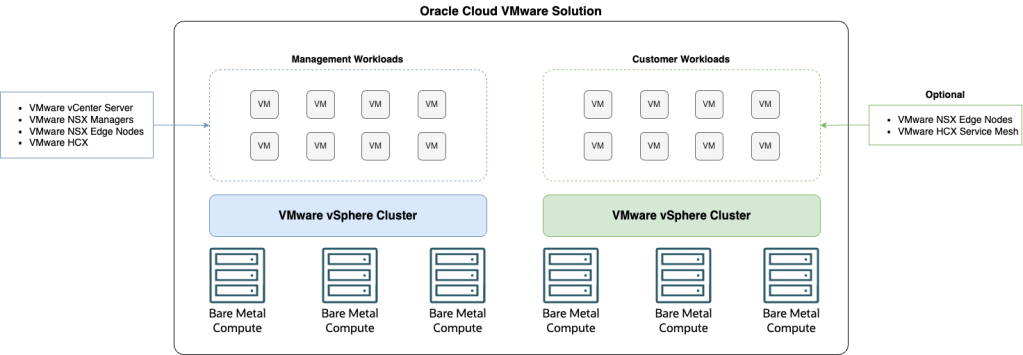
A Standard SDDC always contains one Unified Management Cluster and can have up to 14 Customer Workload Clusters.
Deployment Type
Single Availability Domain
The single-availability domain deployment option for an Oracle Cloud VMware Solution SDDC has two scenarios: One with DenseIO shapes and VMware vSAN as the storage option and the other with standard shapes and Oracle Cloud Infrastructure (OCI) Block Storage as the storage option.
In a single-availability domain deployment with DenseIO Shapes and VMware vSAN as the storage option, the Oracle Cloud VMware Solution cluster stretches across three fault domains within a single availability domain. This standard deployment type supports an availability SLA of 99.95%. With this deployment option, the bare metal hosts are distributed across the three fault domains for maximum resilience within a single availability domain.

In a single-availability domain deployment with atandard shapes and OCI Block Storage as the storage option, the Oracle Cloud VMware Solution cluster stretches across three fault domains within a single availability domain. This standard deployment type supports an availability SLA of 99.95%. With this deployment option, the bare metal hosts are distributed across the three fault domains for maximum resilience within a single availability domain. These bare metal hosts then connect to OCI Block Storage because the standard shapes don’t provide local storage capacity to create a vSAN datastore.
This deployment option is only available for single-availability domain deployments because OCI Block Storage is currently not mirrored synchonously across OCI availability domains.
Multiple Availability Domains
The multiavailability domain deployment option for an Oracle Cloud VMware Solution SDDC is only supported with DenseIO Shapes and VMware vSAN as the storage option. This option is fully unique and only supported with Oracle Cloud VMware Solution on OCI.
In a multiavailability domain deployment with DenseIO shapes and VMware vSAN as the storage option, the Oracle Cloud VMware Solution cluster stretches across three availability domains within an OCI region. This deployment type supports an availability SLA of 99.99%.
With this deployment option, the bare metal hosts are distributed across the three availability domains for maximum resiliency and availability within a OCI public cloud region.
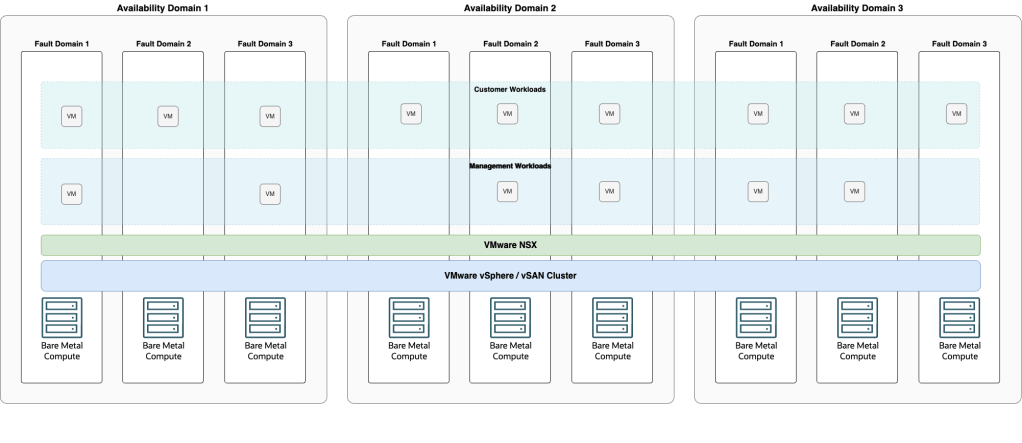
The multiavailability domain deployment is only available in OCI public cloud regions with at least three availability domains. For multiavailability domain deployment, you must reserve at least 33% failover resources to be able to withstand the loss of an availability domain. The same applies to the vSAN configuration if the solution use three nodes, which is the minimum that the vSAN policy must be according to RAID-1 with FTT-1.
This configuration allows a single bare metal host or availability domain to fail.
A multiavailability domain deployment must always scale equally. If you start with the minimum deployment of three nodes, you must scale out in multiples of three nodes to keep the host count evenly distributed across all availability domains. Unequal scaling can result in resource utilization problems and data loss if the bare metal hosts or an entire availability domain fail.
Bare Metal Compute sizing
Based on the information gathered during the discovery phase, the environment sizing parameters can be matched with the Oracle Cloud VMware Solution Bare Metal Shapes, either Standard Shapes with external OCI Block Volume Storage as the primary storage or Dense Shapes with VMware vSAN as the primary storage (OCI Block Volume Storage can be leverage as secondary storage to allow storage scaling independently of host scaling).
Standard Shapes
| Processor type | Shape | OCPU | Core Configurations | Memory (GB) | Network Bandwidth (Gbps) |
| Intel | BM.Standard2.52 | 52 | 12, 26, 38, 52 | 768 | 50 |
| Intel | BM.Standard3.64 | 64 | 16, 32, 48, 64 | 1024 | 100 |
| AMD | BM.Standard.E4.128 | 128 | 32, 64, 96, 128 | 2048 | 100 |
| AMD | BM.Standard.E5.192 | 192 | 48, 96, 128, 192 | 2304 | 100 |
See Compute Standard Shapes for more detail.
Dense Shapes
| Processor type | Shape | OCPU | Core Configurations | Memory (GB) | Local Storage (TB) | Network Bandwidth (Gbps) |
| AMD | BM.DenselO.E4.128 | 128 | 32, 64, 128 | 2048 | 54.4 | 100 |
| AMD | BM.DenselO.E5.128 | 192 | 32, 64, 96, 128 | 1536 | 81.6 | 100 |
See Compute Dense I/O Shapes for more detail.
NVIDIA GPU Shapes
| Processor type | Shape | OCPU | Memory (GB) | GPU | GPU Memory (GB) | Network Bandwidth (Gbps) |
| Intel | BM.GPU.A10.4 | 64 | 1024 | 4 x A10 | 96 | 100 |
See Compute GPU Shapes for more detail.
Network design
Customers require an existing Virtual Cloud Network (VCN) with an IP address CIDR of /24 or larger available for running the managemetn and workload clusters. The following table shows the allowed CIDR sizes and the number of nodes customers can deploy.
| CIDR block size | Segment size | Number of nodes in cluster |
| /24 | /28 | 3 – 12 |
| /23 | /27 | 3 – 28 |
| /22 | /26 | 3 – 30 |
| /21 | /25 | 3 – 64 |
Deployment Checklist
| # | Description | Prepared |
| 01 | OCI Account created with Universal Credits | YES / NO |
| 02 | Service Limits for OCVS checked / Update requested | YES / NO |
| 03 | OCI Secure Landing Zone | YES / NO |
| 04 | On-Premises connectivity (FastConnect / IPSec VPN) | YES / NO |
| 05 | Compartment created for OCVS | YES / NO |
| 06 | Virtual Cloud Network (VCN) for OCVS | YES / NO |
| 07 | Non-Overlapping CIDR Range for VCN | YES / NO |
| 08 | CIDR Range defined for OCVS Cluster within VCN | YES / NO |
| 09 | SSH Key File generated | YES / NO |
| 10 | Naming convention for OCVS (Cluster, ESXi Prefix) | YES / NO |
| 11 | Bastion Host or Bastion Service configured for remote access | YES / NO |
| 12 | OCVS Deployment Model per Cluster defined | YES / NO |
Day 2 Operations Checklist
| # | Description | Prepared |
| 01 | SFTP Server hosted outside OCVS for backups | YES / NO |
| 02 | Backup of VMware vCenter Server Appliance (VCSA) configured | YES / NO |
| 03 | Backup of VMware NSX configured | YES / NO |
| 04 | 3rd Party Backup Solution configured | YES / NO |
| 05 | Monitoring integration | YES / NO |
 Thomas Thyen
Leave a comment